Exploring the Benefits of Retrieval-Augmented Generation ( RAG )

RAG = Retrieval-Augmented Generation.
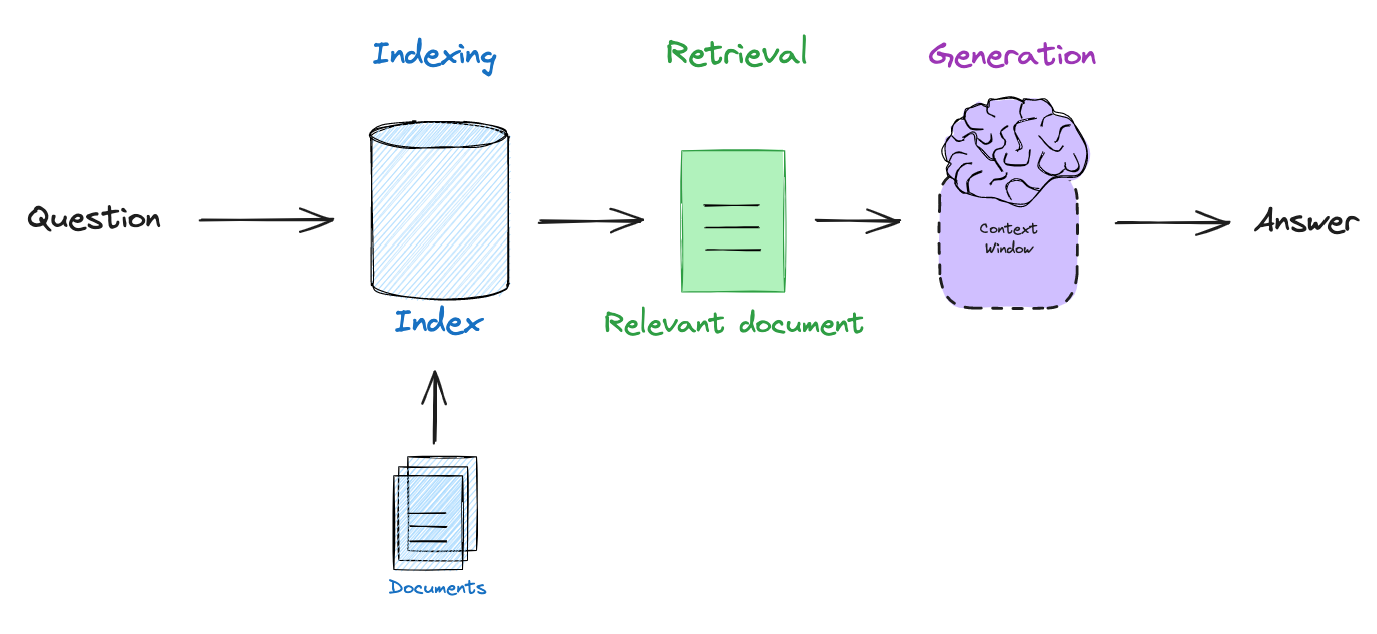
At a high level, it’s any system that retrieves relevant pieces of external knowledge (documents, passages, rows, images, etc.) and conditions a generative model (an LLM) on those retrieved pieces to produce an answer. The central idea: instead of expecting the model to memorize everything, give it pulled-in facts at inference time so responses are more accurate, up-to-date, and controllable.
Why use RAG?
Grounding: reduces hallucinations by providing source text the model can quote or rely on.
Up-to-date / scalable knowledge: index huge corpora (docs, enterprise knowledge, web) without retraining the LLM.
Cost: smaller LLM + retrieval often beats maintaining huge parametric models.
Explainability: easier to cite sources and show provenance.
Core components of RAG
Document Store / Source:
What it is: where your knowledge lives — files, web pages, PDFs, databases, wiki pages, etc.
Why it matters: quality of answers = quality of the source material.
Pro tip: keep metadata (title, date, author, doc-id) for citations.
Chunking / splitting
What it is: breaking long documents into smaller passages (chunks) the retriever/LLM can handle.
Why: prevents losing context and fits within model context windows.
Pro tip: 200–400 tokens per chunk with some overlap (e.g., 20–50 tokens) so you don’t split important sentences.
Embeddings / encoders
What it is: turning text (chunks and queries) into vectors (numbers) that capture meaning.
Why: allows semantic matching so “paraphrase” queries still find the right passage.
Pro tip: use an embedding model tuned for retrieval (dense) for semantic search; keep the model consistent for query + docs.
Vector index / search engine (or sparse index)
What it is: the data structure that stores vectors and lets you find nearest neighbors quickly. (Or BM25 for token-based search.)
Why: you need fast, scalable search across millions of chunks.
Pro tip: for large corpora use ANN structures (HNSW-style) for low-latency nearest-neighbour.
Retriever
What it is: the component that takes a user query, converts it to a vector, and returns the top-N candidate chunks.
Why: it narrows down the huge knowledge base to a manageable candidate set.
Pro tip: initial retrieval uses top-N like 50–200 (if you plan to rerank); final k for generation is typically 3–10.
Reranker (optional but powerful)
What it is: a heavier model that scores the retriever’s top candidates more accurately (often cross-encoder).
Why: improves precision (fewer irrelevant passages passed to the generator).
Pro tip: run reranker only on a small candidate set (e.g., top 50) because it’s expensive.
Reader / Generator (LLM)
What it is: the model that reads the query + retrieved passages and produces the final answer (and citations).
Why: this produces the natural-language response; grounding with passages reduces hallucination.
Pro tip: explicitly instruct the model to cite sources and to say “I don’t know” when info isn’t found.
Orchestration & prompting
What it is: glue code that builds prompts, handles token budgets, formats citations, and coordinates retriever → reranker → generator.
Pro tip: use a prompt template that includes question, short summaries of passages (or passage text), and clear instructions (e.g., “Only use facts in the passages. If unsupported, say ‘I don’t know’.”).
Monitoring, logging & evaluation
What it is: track metrics (recall, latency, hallucination rate), user feedback, and provenance usage.
Pro tip: log which passages were used for each answer so you can diagnose errors.
Access control & privacy
What it is: permissions, redaction, and policies for sensitive data.
Pro tip: separate public and private indices, audit queries, and never expose sensitive doc metadata in answers.
Step-by-step guide — build a simple working RAG system
Decide the scope & collect data
Action: pick the dataset (customer KB, internal docs, papers, personal notes).
Tip: start small (a few hundred docs) so you can iterate quickly.
Preprocess documents
Action: convert PDFs/Docs/HTML to plain text, remove boilerplate, extract metadata.
Tip: keep the original file link or ID for citations.
Chunk documents
Action: split text into overlapping passages (200–400 tokens, overlap 20–50 tokens).
Why: makes retrieval more precise and fits model context.
Generate embeddings for each chunk
Action: feed each chunk to your embedding model → store vector + chunk text + metadata.
Tip: do this offline and persist vectors in your index.
Create an index (vector DB / sparse index)
Action: choose an index (ANN vector DB or BM25). Build the index with your vectors and metadata.
Tip: test small then scale; add metadata fields to filter by doc type/date.
Implement query-time retrieval
Action: on user query: (a) preprocess query, (b) embed it, (c) search index for top-N nearest vectors.
Example values: search top 100 if you plan to rerank, else top 10–20.
(Optional) Rerank the top candidates
Action: run a cross-encoder or other reranker on the retrieved top-N to get a top-k set for generation.
Tip: reranker helps a lot for precision-sensitive tasks like legal or medical Q&A.
Assemble prompt / prepare inputs for the generator
Action: take the top-k passages, format them (include source IDs), and add the user question + instructions.
Prompt example instruction: “Answer using only the passages. If the passages don’t contain the answer, say ‘I don’t know’.”
Token budget: ensure combined prompt + expected answer fits model context.
Call the generator and produce the answer
Action: run the LLM with your prompt → get the answer. Extract and attach citations (doc IDs + passage offsets).
Tip: if answer is long, consider generating a concise summary, then expand on request.
Post-process, display, and log
Action: format citations in the UI, sanitize outputs, and log which passages were used for that answer. Save user feedback.
Tip: allow users to click citations to view source text.
Monitor & iterate
Action: collect metrics: retrieval recall (did the true doc appear in top-N), user satisfaction, hallucination incidents.
Tip: retrain or tune retriever embeddings, tweak chunk sizes, or add more/better docs based on failure modes.
Conclusion
Retrieval-Augmented Generation is more than just a buzzword—it’s a practical bridge between static model knowledge and dynamic, domain-specific information. By combining the precision of search with the fluency of large language models, RAG enables systems to deliver accurate, explainable, and up-to-date answers at scale. As organisations continue to seek trustworthy AI solutions, mastering RAG design patterns and best practices will be a critical step toward building AI applications that are both intelligent and reliable.


